

Farhad Hossen•8 mins
A Complete Guide to Connecting GoHighLevel with Claude Code, Cursor, and Gemini CLI
- AI
- Marketing
Read in 13 mins
Learn how to run a headless GoHighLevel setup. Discover tools, key trade-offs, and a practical Astro + Sitepins + GHL reference architecture.

Author
Farhad HossenPublished on
Categories

GoHighLevel is one of the fastest-growing platforms in the agency software space. Agencies love it for CRM, automation, and client management. But a growing number of developers and agencies are pushing past the native website builder, running GHL as a backend-only system while serving their frontends with Astro, Next.js, or plain HTML.
This is called a headless GoHighLevel setup. And it is becoming more common every month.
This guide covers everything: what GHL is, why the native builder has a ceiling, what headless means in this context, how people are actually running it, what tools they use, and the honest tradeoffs. It also includes a practical reference setup using Astro, Sitepins CMS, and GHL.
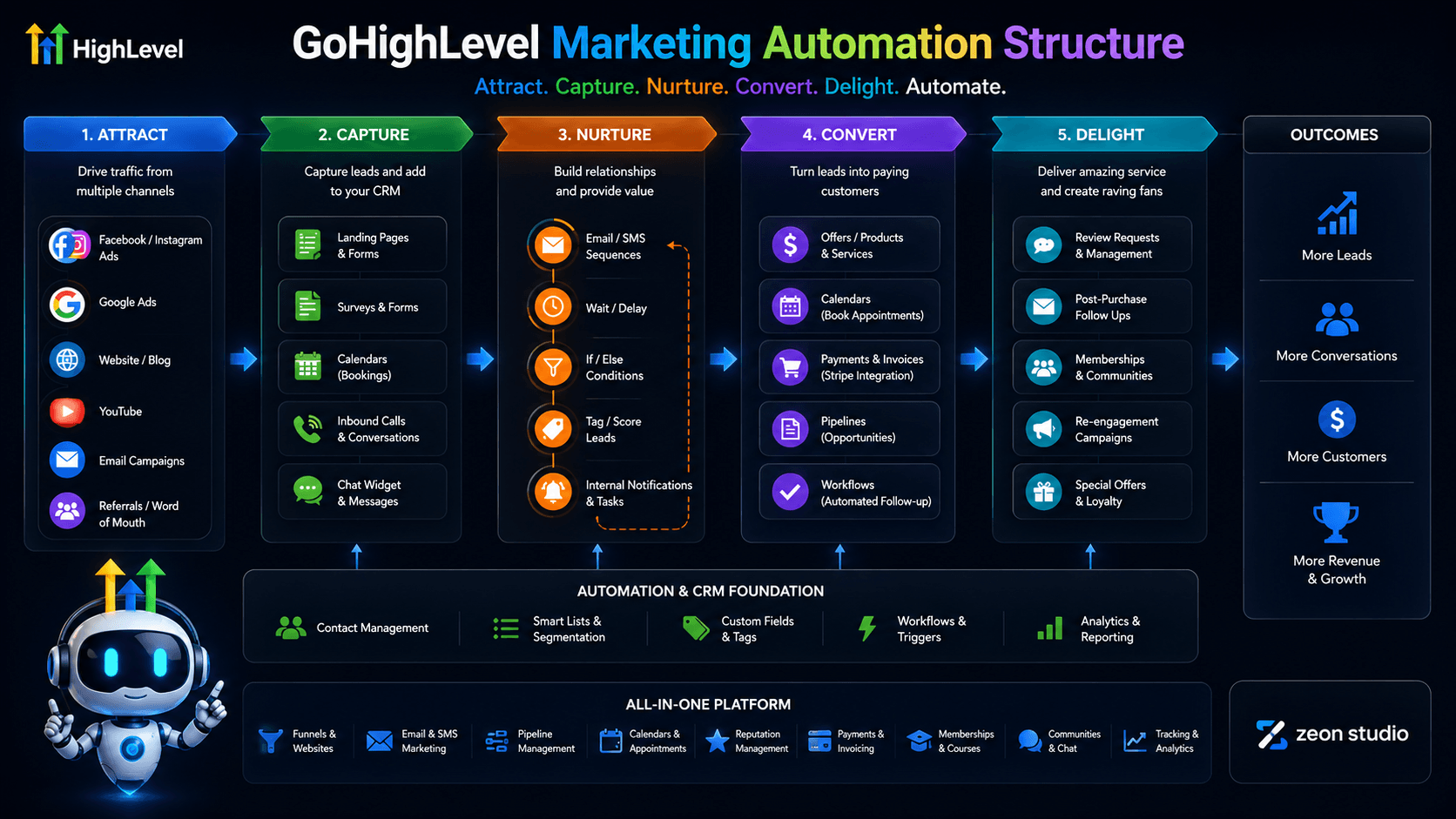
GoHighLevel (also called HighLevel or GHL) is an all-in-one CRM and marketing automation platform built specifically for agencies. It launched in 2018 and has grown to become one of the dominant platforms in the agency software category.
The pitch is consolidation. A typical agency stack before GHL might include a CRM, an email tool, an SMS tool, a calendar scheduler, a funnel builder, a landing page tool, and a reporting dashboard. GHL replaces most or all of these with a single platform.
Core GHL features include:
The white-label angle is a major differentiator. Agencies can rebrand GHL as their own software product and resell access to clients, creating a recurring revenue stream on top of their service work.
GoHighLevel Pricing (2026):
GoHighLevel serves a specific type of customer. The platform is not built for solo bloggers, e-commerce stores, or enterprise software teams. It is built for:
Marketing agencies are the primary audience. Agencies managing multiple client accounts benefit most from the sub-account architecture. Each client gets their own GHL environment, managed from the agency’s main dashboard.
Consultants and freelancers are solo operators who want CRM and automation without stitching together five separate tools.
SaaS entrepreneurs use GHL’s white-label SaaS mode to build and sell their own branded marketing software.
Local service businesses such as dentists, law firms, real estate agents, and gyms use GHL (often set up by an agency) for lead capture, appointment booking, and follow-up automation.
As of May 2026, GoHighLevel reports over 70,000 customers, with more than 500,000 live websites and landing pages powered by it.
Five reasons drive most adoption decisions.
1. It replaces multiple subscriptions
GHL Unlimited at $297/month replace tools that most agencies pay $400 to $700/month for separately. The math is obvious for agencies managing multiple clients.
2. Sub-account architecture
One agency account. Unlimited client sub-accounts. Each client has their own isolated environment. Agencies can deploy pre-built “snapshots” (templates for entire client setups) in minutes.
3. White-label SaaS revenue
Agencies resell GHL as their own software. Instead of just delivering services, they build a recurring software revenue stream with no development cost.
4. Automation depth
GHL’s workflow builder handles complex, multi-step automations: if a lead fills out a form, send an SMS, wait two hours, send an email, assign to a pipeline stage, notify the sales rep. All in one place.
5. AI Employee suite (2026)
GHL added Voice AI and Conversation AI as production-ready features in 2025 and extended them significantly in 2026. These handle inbound calls, book appointments, and respond to leads via SMS and chat, without human intervention. The AI Employee bundle costs $97/month per sub-account.
Here is where the honest part starts. GHL is exceptional at backend operations. The native website builder is a different story.
This is the most documented and measurable problem.
Standard GHL sites score between 20 and 45 on Google’s PageSpeed mobile test. The 90+ threshold is where Google considers performance “good” for Core Web Vitals rankings. The gap is significant.
The specific failures are architectural, not configuration problems:
GHL’s own community forums document users stuck at PageSpeed scores of 35, 47, and 62 even after image compression, script minification, and removing third-party tracking. The ceiling is the platform architecture itself.
For agencies running SEO-focused campaigns, this is a real problem. Organic search rewards pages that pass Core Web Vitals. A GHL-native site competing against a well-built Astro or Next.js site is at a measurable structural disadvantage.
GHL has added more SEO configuration options over time, but the platform still requires deliberate, manual governance for things that WordPress handles automatically.
/home-1 or /services-v2.As one technical SEO audit of GHL put it: “GoHighLevel is a Ferrari of conversion, but SEO is the road it drives on. If the road is broken, the car won’t go anywhere.”
The drag-and-drop grid builder has improved significantly. GHL now offers over 1,000 templates. But there is a ceiling.
Agencies building for local clients who need a fast, functional site reach that ceiling rarely, if ever. Agencies building for SaaS companies, premium brands, or clients with strong design standards hit it regularly.
The constraint is structural: a grid-based drag-and-drop editor cannot produce the same output as a developer working directly in code with a component framework, custom animations, and full control over every element.
This matters especially for headless setups, so it will come up again later. GHL’s REST API covers contacts, calendars, opportunities, forms, and pipelines. It does not cover workflow creation, automation management, or several other core platform functions. Those require logging into the GHL UI directly.
The GHL team is API-first in direction, but the current API is not yet comprehensive enough to build a fully browser-free operation.
“Headless” means decoupling the frontend (the part users see) from the backend (where data lives and operations run).
In a traditional GHL setup, GHL handles everything: the CRM, the automations, and the website itself. All from within GHL’s environment.
In a headless GHL setup, GHL still runs the CRM, automations, pipelines, and data operations. But the website, landing pages, and customer-facing interfaces are built and served by a separate modern framework: Astro, Next.js, or even plain HTML.
The mental model is simple:
GHL = the brain (data, logic, automation)
Your frontend = the face (what visitors see and interact with)
They connect through two methods: embedded GHL widgets (forms, calendars) or the GHL REST API and webhooks. More on both shortly.
Decoupling backend operations from frontend presentation is not a new idea. It has been the dominant pattern in enterprise software for years, and it is now moving into the agency and mid-market software space.
The most dramatic recent signal came from Salesforce in April 2026.
Salesforce, which built its entire business model on users working inside Salesforce’s UI, announced Salesforce Headless 360. The announcement framed the shift directly: “Why should you ever log into Salesforce again?” The product exposes every Salesforce capability as an API, MCP tool, or CLI command, so both humans and AI agents can operate the platform from any surface, without a browser.
The stated reason was AI agents. As Salesforce put it: agents do not navigate UIs, they call APIs. Platforms that require users to click through UIs are not ready for the agentic era.
GoHighLevel is at an earlier stage of the same transition. The agency community is leading the shift before GHL’s own tooling catches up. The pattern is consistent across the industry: backend platforms decouple from their frontends as developer expectations rise and AI-native workflows become standard.
Based on real conversations with the GHL developer community, five motivations come up repeatedly.
Agencies running SEO-focused services cannot pitch clients on top Google rankings while their own GHL site sits at a PageSpeed score of 38. A custom Astro or Next.js frontend can consistently deliver 95+ Core Web Vitals scores. That is not a marginal improvement. It is the difference between passing and failing Google’s ranking threshold.
Agencies coming from a Webflow or design-heavy background want pixel-level control. Custom animations, proprietary component libraries, and layouts that look nothing like a GHL template. The native builder cannot deliver this. A code-based frontend can.
Full control over schema markup, canonical tags, sitemap structure, and rendering behavior. For agencies whose core offer is organic growth, this is not optional.
As search shifts toward AI-generated answers (Google AI Mode, ChatGPT, Perplexity), AEO (Answer Engine Optimization) matters more. Structured, well-marked-up content is more likely to be cited by AI systems. This requires clean HTML output, which a modern framework provides and GHL’s native builder does not.
This is the newest and fastest-growing reason, and it was not part of the conversation two years ago.
Practitioners in the GHL community are now building and managing their client sites entirely through AI agents. Claude Code, Cursor, and n8n are being used to generate, update, and deploy sites without touching a drag-and-drop editor. One developer reported using “custom design skills built via Claude Code” to handle all client site builds. Another is building a Claude-powered website builder in Next.js on top of GHL’s location and team IDs.
This is the same shift Salesforce is responding to at the enterprise level. GHL’s native builder is not compatible with agentic workflows. A code-based frontend is.
Clients who want their site to look like a proprietary product, not like a GHL template, need a custom frontend. This is especially relevant for agencies white-labeling GHL as their own SaaS: the client-facing product cannot look like GHL.
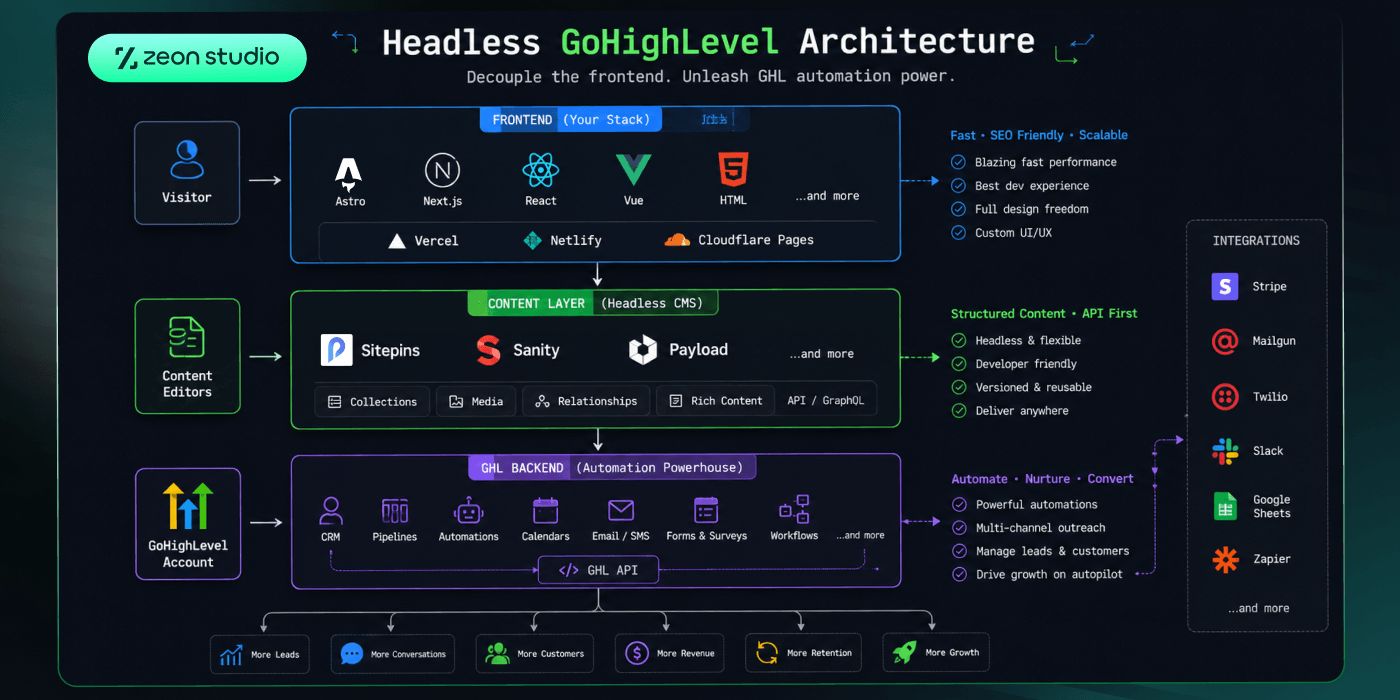
The architecture looks like this:
Visitor
   ↓
Frontend (Astro / Next.js / HTML)
Hosted on Vercel / Netlify / Cloudflare Pages
   ↓
Content managed via CMS (Sitepins / Sanity / Payload)
   ↓
GHL Backend
CRM · Pipelines · Automations · Calendars · Email/SMS
Connecting the frontend to GHL happens through two methods.
GHL generates embed snippets for forms, calendars, and chat widgets. You paste these into your frontend template. When a visitor fills out the form or books an appointment, the data goes directly into GHL. Automations trigger normally. The CRM updates normally.
This is the simplest approach. No API integration required. Works out of the box. Most agencies running headless setups start here.
The limitation is styling. GHL’s embedded widgets come with their own CSS. Matching them to a custom frontend design requires CSS overrides and some patience.
For deeper integration, GHL’s REST API and webhook system let you pass data programmatically between the frontend and GHL.
Common API use cases:
GHL’s API covers:
GHL’s API does NOT cover (as of mid-2026):
These still require logging into the GHL UI directly. True fully-headless operation, where clients never need a GHL login, is not achievable with the current API. The GHL team is aware of this and the API coverage is expanding, but the gap exists today.
For developers building Next.js integrations, the GHL SDK provides a structured wrapper around the REST API. It handles authentication and reduces boilerplate compared to raw API calls.
Many headless GHL setups use n8n or Zapier as a middleware layer for more complex data flows. This is especially useful when you need to enrich contact records, trigger multi-step automations from frontend events, or sync data between GHL and an external database like Airtable.
| Layer | Options |
|---|---|
| Frontend framework | Astro, Next.js, Nuxt, vanilla HTML/CSS |
| Hosting | Vercel, Netlify, Cloudflare Pages |
| CMS | Sitepins, Sanity, Payload CMS |
| GHL connection | GHL embed widgets, GHL REST API, GHL SDK |
| Middleware | n8n, Zapier, Make |
| External database | Airtable, Supabase |
| Agentic build tooling | Claude Code, Cursor |
Framework selection guidance:
Real performance scores. 95+ Core Web Vitals is achievable and consistent with a modern framework. It is not achievable with GHL’s native builder at a structural level.
Full design control. Any layout, any component library, any animation. No grid constraints.
SEO and AEO ownership. Clean HTML output, full control over schema, canonical tags, sitemaps, and rendering. Critical for agencies building organic growth strategies or preparing for AI search visibility.
Agentic-friendly. Build and update sites through AI agents, CLI tools, and code editors. Not drag-and-drop. This matters now and will matter more as agentic workflows become standard.
Stack flexibility. Swap hosting, CMS, or framework without touching GHL. Your marketing engine is not coupled to your frontend choice.
Proprietary feel. Client sites look like the client’s product, not a GHL template.
GHL does what it does best. CRM, automation, pipelines, AI Employee, Voice AI. None of this changes. You keep all of it. You just stop asking GHL to also be a high-performance website platform.
Do not skip this section. These are real tradeoffs.
Incomplete API coverage. Workflows, automations, courses, and communities cannot be managed via API. Clients will still need GHL logins for some tasks. Plan for this.
More moving parts. You are now managing a frontend framework, hosting, a CMS, and the GHL integration in addition to GHL itself. For a solo agency operator, this is more overhead.
Slower to spin up. GHL’s native builder is genuinely fast for standard use cases. A headless setup takes more time to configure initially.
CSS override friction. GHL embed widgets (forms, calendars) come with their own styles. Matching them to a custom design requires CSS work. Two-way calendar sync has known edge cases.
Higher initial cost. Additional hosting, a CMS subscription (if not using a free/Git-based option like Sitepins), and developer time all add up compared to staying native.
Not the right choice for every project. If a client needs a fast funnel for a local service business and does not care about design differentiation or SEO, GHL native is the pragmatic choice. The headless path is for specific situations, not every situation.
Here is a reference architecture for agencies building marketing sites for local businesses or SMBs who want GHL’s CRM and automation with a fast, brandable frontend.
Agencies with clients who are not tech-savvy, want GHL on the backend for lead management and automation, and need a site that ranks well, loads fast, and looks like their own product.
| Layer | Tool | Why |
|---|---|---|
| Frontend | Astro | Static-first, minimal JS, 95+ Core Web Vitals, strong content tooling |
| CMS | Sitepins | Git-based, visual editing without a database, works natively with Astro, no extra infrastructure |
| Backend | GoHighLevel | CRM, automation, pipelines, calendars, email/SMS |
| Hosting | Vercel or Netlify | Edge deployment, instant cache invalidation on content updates |
Content editing: Sitepins manages all page content. Blog posts, service pages, landing pages, team bios. Editors update content through a visual interface without touching code or markdown directly. Changes commit to Git and trigger a Vercel rebuild. The site updates in minutes.
Lead capture: GHL form and calendar widgets are embedded into Astro pages via GHL’s embed snippets. When a visitor submits a form or books an appointment, the data goes directly into GHL. All automations trigger normally.
Advanced data flow: For setups requiring UTM parameter tracking or contact enrichment, a lightweight n8n workflow can sit between the frontend form submission and GHL, enriching the contact record before it lands in the CRM.
On the Sitepins side: a visual editor for their content. No code. No deployment commands. No GHL involvement.
On the GHL side: their usual CRM, inbox, pipeline, and automation dashboard. Nothing changes there.
The site is theirs. It looks like their product. It loads fast. And GHL hums in the background doing what it is best at.
An Astro frontend built without heavy third-party scripts and with images properly sized and lazy-loaded will consistently score 90 to 100 on Google PageSpeed. That is the top bracket. Compare that to the 20 to 45 range typical of GHL-native sites and the difference is the gap between passing and failing Core Web Vitals as a ranking signal.
| Situation | Recommendation |
|---|---|
| Building fast funnels for local clients who don’t care about design | Stick with native GHL |
| Agency with design standards and SEO-focused service offer | Headless makes sense |
| Building a white-label SaaS product | Headless is almost required |
| Agentic / AI-first development workflow | Headless is the only viable path |
| Solo operator with no developer resources | Native GHL or GHL AI Studio |
| Client wants the site to look like their own product | Headless |
| Client just needs a funnel live by Friday | Native GHL |
The GHL community is running ahead of GHL’s own tooling here. Agencies are doing headless setups not because GHL supports them natively, but because the business case is strong enough to justify the integration work.
GHL is aware. Their own team noted in community discussions that SSG (static site generation) support is in development. AI Studio (GHL’s newer visual website builder) is more capable than the legacy drag-and-drop editor, but it remains within GHL’s controlled rendering environment.
Meanwhile, Salesforce’s Headless 360 announcement makes the direction of the industry clear. Every major backend platform is moving toward full API exposure, MCP tool support, and agent-compatible architecture. GHL will follow. The question is how long the gap stays open.
For agencies who want to move now, the headless path is practical today. The tools exist, the integration methods work, and real agencies are running client sites on this architecture.
GoHighLevel is genuinely excellent at what it does: CRM, automation, pipelines, and client management. The native website builder is a reasonable choice for standard agency use cases, and it keeps getting better.
But there is a real ceiling. Performance, design control, technical SEO, and agentic workflows all push against it. When any of those things matter for a client or project, the headless path is the answer.
The architecture is not complicated. GHL keeps doing the backend work it is good at. A modern frontend handles what GHL’s builder was never optimized for. They connect through embeds and webhooks, with optional middleware for more complex flows.
That is it. The backend stays powerful. The frontend gets fast, flexible, and fully owned.