

Farhad Hossen•8 mins
A Complete Guide to Connecting GoHighLevel with Claude Code, Cursor, and Gemini CLI
- AI
- Marketing

Read in 6 mins
GoHighLevel cannot natively host llms.txt files at the root of a domain. Here is the manual community workaround, what Google actually says about llms.txt, and a faster automated solution built for GHL sub-accounts.

Author
Farhad HossenPublished on
Categories
llms.txt file is not a search ranking factor. Instead, it serves as a “functional” utility to help AI agents parse site data efficiently post-discovery.llms.txt is an open standard (defined at llmstxt.org) that gives AI models a structured map of your site. It lives at yourdomain.com/llms.txt and contains your key pages, URLs, and short summaries formatted in plain Markdown.
Before setting this up on a GHL site, it is worth being honest about what the file actually does.
Google’s Search Advocate John Mueller addressed this directly on Bluesky (May 2026). SEO expert Lily Ray asked him about the irony of Google publishing llms.txt files for its own developer docs while also saying the format is not needed for search performance. Mueller’s response was clear:
For non-developer sites, I don’t think this makes much sense, even with more agentic traffic in the future… Making a markdown version of a shoe’s specs is not going to get you more sales.
Your site (all sites) have much more important things to do for SEO than to prepare for a potential future situation that may or may not come. Prioritize needs before dreams.
.png)
His reasoning: llms.txt exists primarily to help AI coding tools read developer documentation faster, not to boost search rankings. He frames it as “a temporary crutch, perhaps to save some tokens.”
So why add it at all?
Because traditional search is not the only use case. AI agents, coding assistants, and tools like ChatGPT and Perplexity do use structured site context when it is available. For GHL agencies that serve tech-forward clients, build documentation-heavy sites, or want their site structure readable by AI tools and agents, having a valid llms.txt is still worth doing.
Just do not add it expecting a rankings boost. Add it to make your site easier for AI systems to parse and work with.
The problem: GHL cannot serve .txt files from the root of a domain. The platform’s website and funnel builder only supports standard page slugs. You cannot upload a raw text file and have it resolve at /llms.txt.
The GoHighLevel user community utilizes an external hosting and URL redirection workaround to deploy an llms.txt file. This manual process requires technical configuration across multiple platforms and demands ongoing maintenance whenever you change your website layout. Here is the full process.
Follow the llmstxt.org standard. The file uses Markdown formatting and includes:
A basic example:
# Your Business Name

> A one-sentence description of what your site does.

## Pages

- [Home](https://yourdomain.com/): Overview of services and offers.
- [Services](https://yourdomain.com/services): Full list of agency services.
- [Contact](https://yourdomain.com/contact): Book a call or send a message.
Write this in any text editor and save it as llms.txt.
GHL cannot serve the file directly, so you host it somewhere that generates a public raw URL.
Two popular options:
https://gist.githubusercontent.com/.../raw/llms.txttext/plain.Either option gives you a permanent, public URL for the file.
/llms.txt.Visit https://yourdomain.com/llms.txt in your browser. If the file content loads, the redirect is working.
You can also test it with curl:
curl -I https://yourdomain.com/llms.txtLook for HTTP/2 301 followed by the redirect to your external URL, then HTTP/2 200 on the final response.
What this method does not do well: Every time you add a page, change a URL, or update your site, you have to manually update the external file. If you manage multiple GHL sub-accounts, you repeat this process for each one. Non-technical users will find this hard to maintain without developer help.
This is exactly why GHL users have upvoted the native feature request on the Ideas Board and why that thread has been active since May 2025 with no resolution from GHL yet.
LLMS.txt Generator for GHL is a GHL Marketplace app built by Zeon Studio that automates everything in the manual process above.
It crawls your active pages, generates a standards-compliant file, uploads it to your Media Storage, and creates the /llms.txt redirect - automatically.
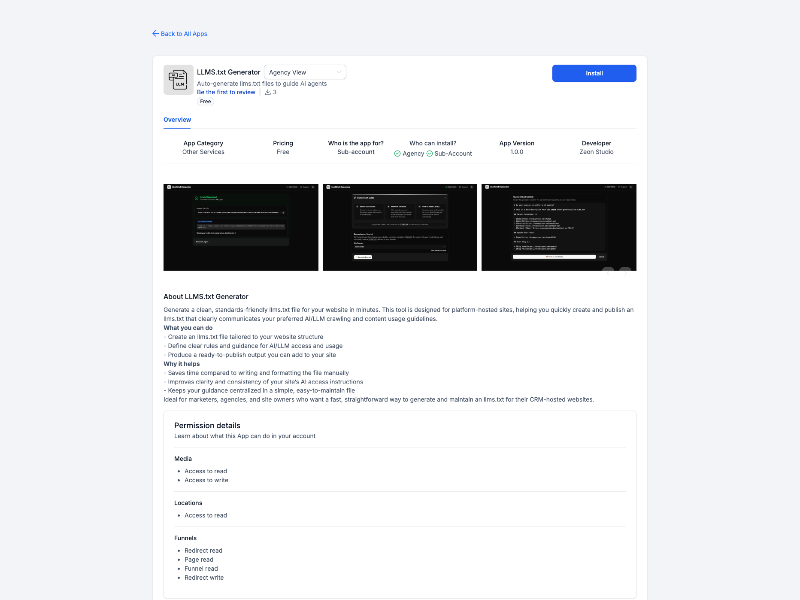
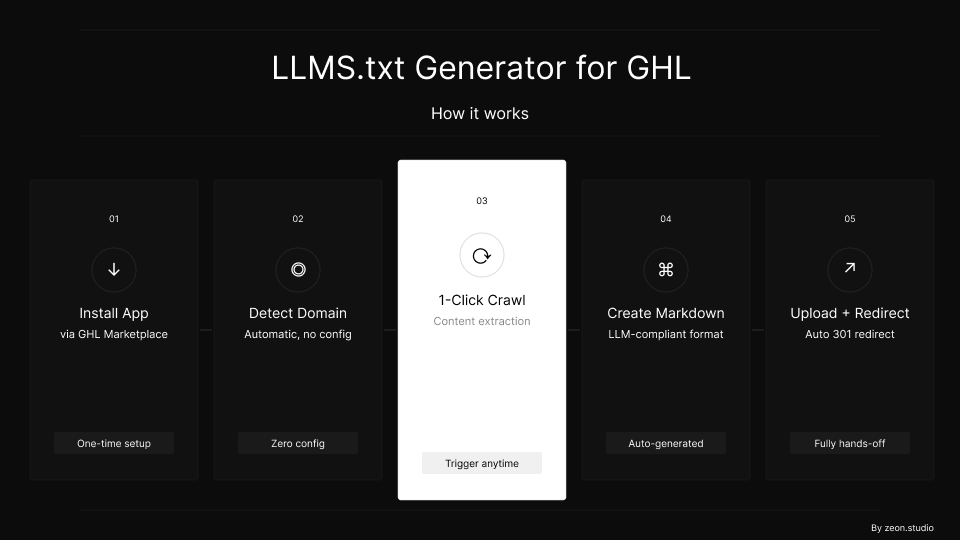
Step 1: Install the app from the GHL Marketplace. Find “LLMS.txt Generator for GHL” in the GHL Marketplace and install it into your sub-account. The authorization uses OAuth 2.0 so no passwords stored.
Step 2: The app detects your connected domains. After connecting, it automatically pulls all domains linked to the sub-account. No manual configuration needed.
Step 3: Select your target domain and click “Generate llms.txt.” Pick the domain you want to target. One click starts the generation process.
Step 4: The app crawls all your active pages.It scans every active funnel step and website page connected to that domain and compiles the URLs and page data into a structured Markdown file following the llmstxt.org specification.
Step 5: One-click upload and redirect.The app uploads the generated file to your GHL Media Storage and creates a 301 redirect from /llms.txt to the hosted file. Your file is live at yourdomain.com/llms.txt within seconds.
No GitHub account. No S3 bucket. No manual redirect setup. No developer needed.
When your site changes, you run the generator again to refresh the file. The whole process takes under two minutes.
| Deployment Criteria | Manual Method | LLMS.txt Generator App |
|---|---|---|
| Setup time | 20-40 minutes | Under 2 minutes |
| Technical skill required | Medium (file hosting, redirects) | None |
| Auto-detects pages | No | Yes |
| Hosting Dependencies | External (GitHub Gist or AWS S3) | Native GoHighLevel Media Storage |
| Standards-compliant output | Depends on you | Yes (llmstxt.org) |
| Works across multiple sub-accounts | Manual repeat each time | Per-account, same process |
| Maintenance when site changes | Manual file update | Re-run the generator |
| Cost | Free | Free |
Short answer: No. Google’s John Mueller stated in May 2026 that llms.txt does not help with traditional search performance. Sites have more important SEO priorities than adding this file. Its value is in AI agent workflows and developer tooling, not Google rankings.
It helps AI coding assistants, agent-based tools, and AI models like ChatGPT, Gemini and Perplexity understand your site structure when they access it directly. Mueller confirmed Google uses it for its own developer documentation specifically because AI coding tools benefit from structured, Markdown-formatted reference material.
No. GHL’s website and funnel builder does not support uploading or serving raw .txt files from the root of a domain. Pages must use standard URL slugs. This is an open feature request on the GHL Ideas Board with 50+ votes as of May 2026.
Yes. A standard 301 redirect from /llms.txt to an externally hosted file works correctly. AI crawlers follow redirects and read the file content. The output is functionally identical to a natively hosted file.
Update it whenever you add new pages, remove old ones, or significantly change your site structure. For active sites, a monthly review is a reasonable starting point. With the LLMS.txt Generator app, re-running the generator takes under two minutes.
Yes. The app crawls all active pages connected to the selected domain, including funnel steps and website pages inside the sub-account.
No. robots.txt tells crawlers which pages they are allowed or not allowed to visit. llms.txt is specifically for AI language models. It gives them a curated list of your most useful content rather than a list of access rules. The two files serve different purposes and you can have both.
llms.txt is not a traditional SEO tactic. Google’s John Mueller is direct about that. But it does have real value for sites that want to be readable by AI agents, coding tools, and AI-powered workflows and that use case will only grow.
GHL does not support native .txt file hosting at the domain root. The manual workaround: external hosting plus a URL redirect gets the job done, but it takes setup time and breaks down for non-technical users or anyone managing multiple accounts.
If you decide llms.txt is worth adding to your GHL site, the LLMS.txt Generator for GHL handles it end-to-end. Install it from the GHL Marketplace, connect your sub-account, and your file is live in under two minutes.